What grade is
your backlog?
Get your backlog rank — S through F— plus the hours and dollars tied up in games you've never launched. 60 seconds, no account needed.
Just a Steam ID · Nothing to install · No password, ever
That's just
your Steam pile
That grade only counts Steam. Connect your PlayStation, Xbox and Nintendo libraries to see the real damage.
VaultCheck is the only extension that checks your console libraries too. Before you buy, it tells you three things: whether you already own it, whether it's free on a subscription you already pay for, and whether it's cheaper somewhere else.
No passwords, ever · Free · Uninstall anytime
Works across your connected platforms
The problem
Sound familiar?
The double-buy
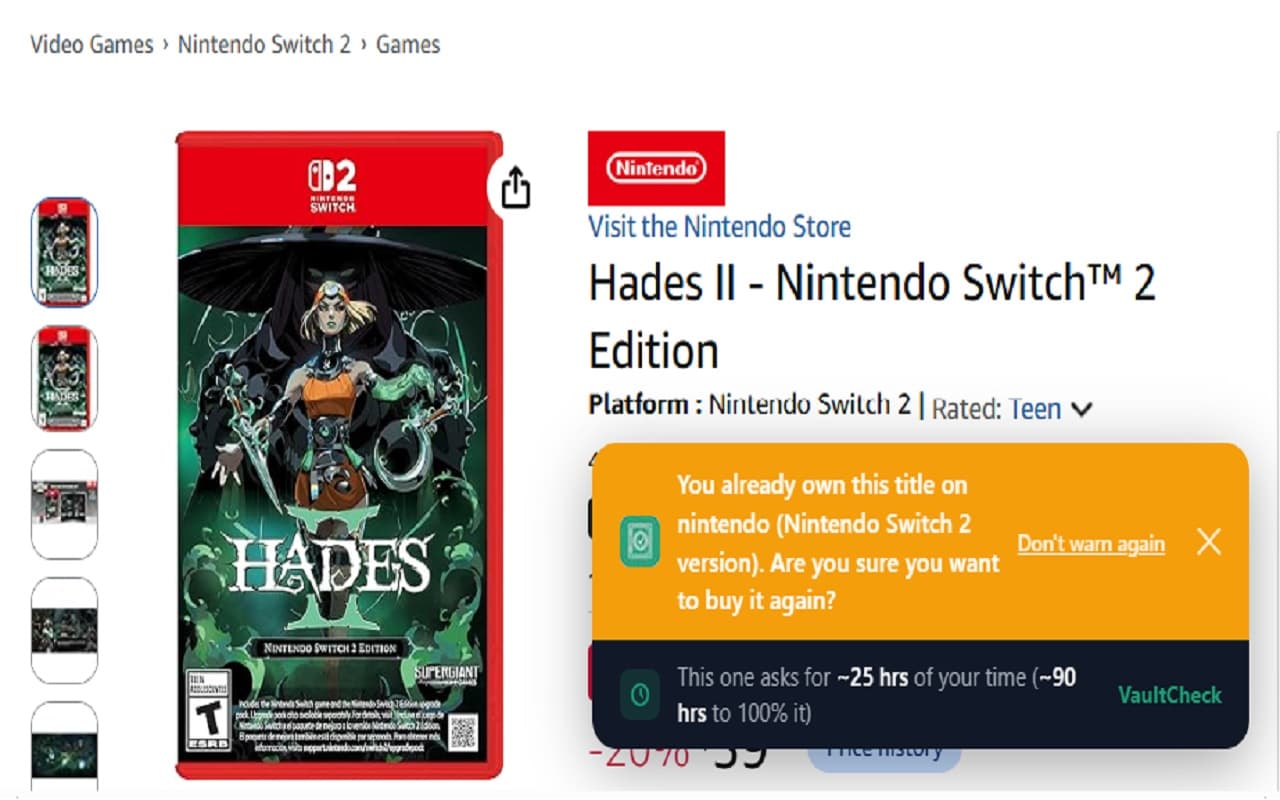
Spotted a sale, clicked buy, then realised you already have it on another platform.
Backlog blindness
Your library spans so many stores you genuinely don't know what you own anymore.
The unfinished pile
Bought it, played 2 hours, quit — then bought something just like it on impulse again.
The double-pay
Paid full price for a game that was on Game Pass or PS Plus the whole time.
How it works
Three steps to spending less on games
01
Connect Steam
About 30 seconds through Steam's official sign-in — no password ever reaches us. Your library imports automatically and duplicate checks go live at every store you shop.
02
Add consoles and subscriptions (optional)
Link PlayStation, Xbox, Nintendo and Epic whenever you're ready, and tell VaultCheck which subscriptions you pay for. Every one you add sharpens the checks.
03
Shop anywhere
A card appears on the page — “You already own this on PlayStation,” “Included with Game Pass,” or “Cheaper elsewhere: $14.99 at Fanatical” — then you decide.
Features
Everything you need before you buy
Duplicate Detection
Warns you before purchasing something you already own on any connected platform.
On Your Subscriptions
Have Game Pass or PlayStation Plus Extra? VaultCheck flags a game that's already included — so you don't pay for what you can already play.
Cheaper Elsewhere
VaultCheck checks other stores for a lower price on the same game — right on the page, before you buy.
Checkout Warning
Last-chance full-screen alert before you click pay — the moment that matters most.
Cross-Platform
Steam, PlayStation, Xbox, Nintendo, and Epic — all your libraries in one place.
Time to Complete
See how long a game takes to beat before you buy — and how many hours it would add to a backlog you might never finish.
Platforms
All your platforms, one place
Connect once. Resync anytime in one click.
More platforms on the way
Private by design
Your accounts stay yours
No passwords, no browsing history — just the games you own.
No passwords, ever
Steam connects through its official API — your password goes to Steam, never to us. PlayStation, Xbox, Nintendo, and Epic are read from your own library page while you’re already signed in.
Only your game titles
We store the names of games you own, which platforms they’re on, and any game subscriptions you tell us you pay for — nothing else. No browsing history, no keystrokes, nothing from pages outside the supported stores.
Checks only what you’re viewing
On a store page, the extension reads just that game’s title and checks it against your library and your subscriptions — and on PC stores, looks up a cheaper price via CheapShark. It does nothing on other sites.
You stay in control
Disconnect any platform, or delete your account and entire library, at any time from your dashboard.
Full details in our Privacy Policy.
Why I built this
“I have years' worth of games I bought but never played, split across platforms with no single view of what I actually own or what my subscriptions include. I bought Hades, Contra Anniversary Collection and SteamWorld Dig 2 twice. It felt embarrassing, and wasteful. That's why I built VaultCheck — so you always know, before you buy, whether you already own it.”
Pricing
Simple, transparent pricing
Start free. Go Premium to get the most out of the library you already own.
Free
Everything you need to get started.
- ✓All platforms — Steam, PlayStation, Xbox, Nintendo & Epic
- ✓Duplicate detection across every library
- ✓Subscription checks — is it free on Game Pass or PS Plus?
- ✓Cheaper-elsewhere price check at the store page
- ✓Checkout warning screen
- ✓Time to complete data
Premium
Billed monthly, cancel anytime
- ✓Everything in Free
- ✓Backlog analytics — see what you actually have
- ✓Subscription value — how much of your subs you already own
- ✓Savings tracker
- ✓Priority support
FAQ
Frequently asked questions
Play what you paid for
Before you buy any game, know if you already own it, if it's on a subscription you pay for, or if it's cheaper elsewhere.
Add to Chrome — it's free